Features

School management software features, module by module

Premeena is free school management software for K-12 schools. Below is every module in it, what each one does, and where to read more. All of them share one student record, so nothing is typed twice.

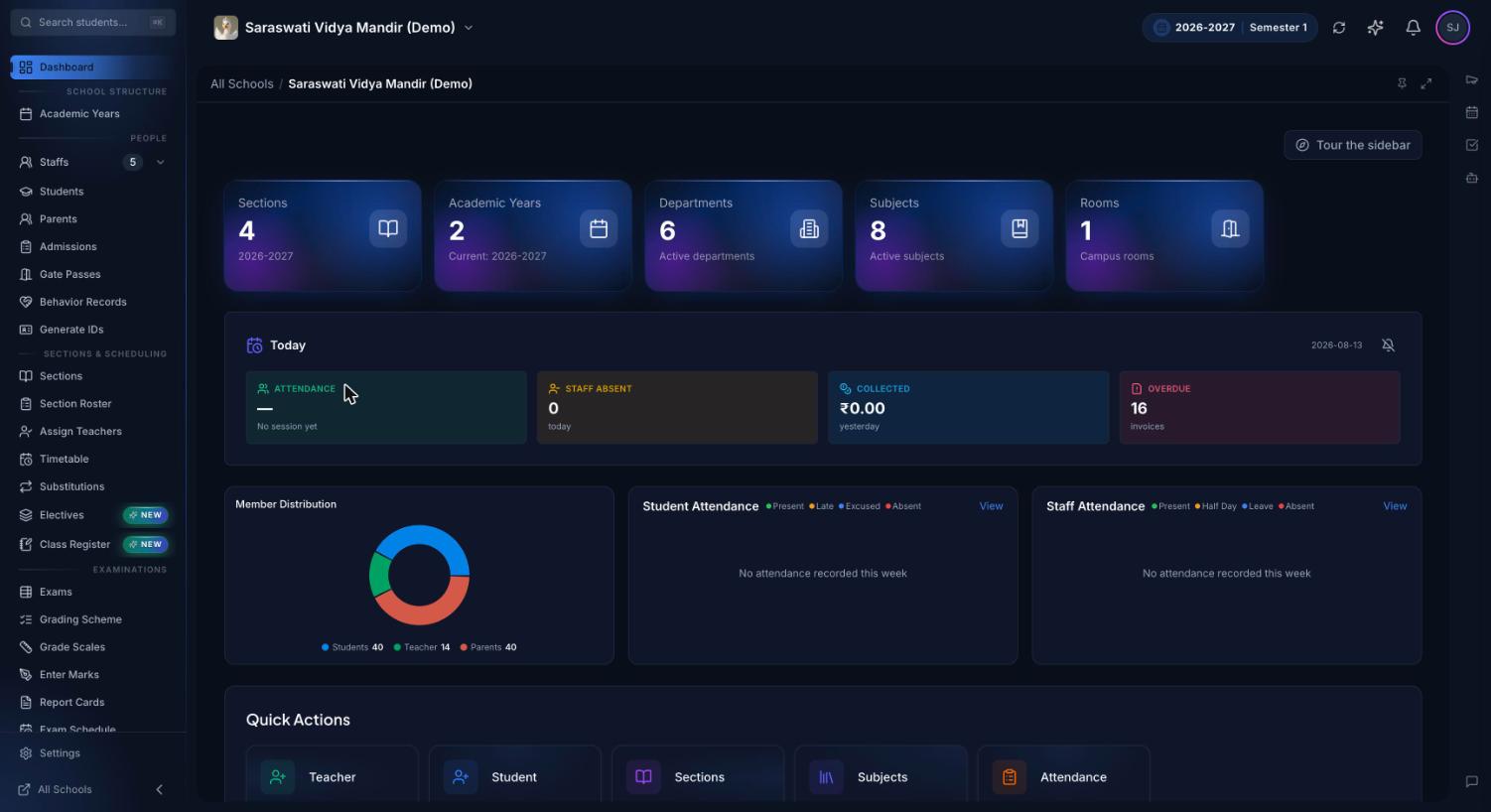
Premeena school dashboard showing today's attendance, fee collection, upcoming events and quick links for a school owner
The owner's dashboard: today's attendance, collections and what needs attention, on one screen

What is school management software?

School management software (also called a school ERP or student information system) is a single system for a school's day-to-day records: admissions, student and staff profiles, attendance, timetables, exams and marks, fees and invoices, payroll, and communication with parents. Everyone works from the same data, each person sees only what their role allows, and reports come straight from the records instead of being assembled by hand.

Most schools reach for it when the registers, spreadsheets and messaging groups stop agreeing with one another: the fee file says one thing, the class teacher's register another, and the report card is typed up from both. Premeena replaces those copies with one record per student, which every module reads from and writes to.

Core modules

The modules most schools switch on first. Each has its own page with the full details, screenshots and an honest list of what it doesn't do yet.

Admissions

An online admission form on your website, an enquiry-to-enrolment pipeline with interviews and waitlists, document collection from parents, and one-click enrolment that creates the student record.

Attendance

Daily and period-wise registers with present, absent, late and excused. Finalising the register emails and notifies parents of absent students, and monthly views and summaries fill in automatically.

Face recognition attendance

Scan the whole class with a phone or laptop camera to pre-fill the register. Recognition runs on the device, and only a numeric face signature is stored, never a photo.

Fee management

Fee structures, per-student installments, invoices and receipt PDFs, recorded payments, aging reports and email/push reminders, with a read-only fee view for parents.

Exam management

Plan exams from draft to published results, schedule papers, issue admit cards, track marks entry paper by paper, and lock results once they're final.

Report cards

Your own grade scales (including a CBSE preset), weighted exam types and term weights. Term and year report cards are generated as PDFs for a whole class at once.

Timetable

A grid builder that warns you about teacher and class clashes as you place lessons, plus day-by-day substitutions (arrangement periods), a weekly schedule for every teacher and a personal timetable for every student.

Parent & student portal

Parents and students see attendance, timetables, homework, results and fees, and get notifications in the browser. Works on any phone and can be installed to the home screen.

HR & payroll

Staff attendance, leave types and balances, salary components, monthly payroll runs with loss-of-pay from attendance, and payslip PDFs.

Front desk

Student gate passes with guardian confirmation, late arrivals that flow into the register, visitor check-in with badges, and appointments.

AI assistant

Owners and managers can ask questions about the school's own data in plain English, such as who was absent today or which invoices are overdue. It reads data and never changes it. Bring your own AI key or use AI credits.

More modules in the free core platform

These don't have their own feature page yet. The help centre explains how each one works.

ModuleWhat it doesRead more
Homework & assignmentsPost homework, collect submissions, grade with feedback and keep parents informed.Homework guide
MessagingOne-to-one and group chats between staff, students and parents, with mentions and moderation rules set by the school.Messaging guide
Video callsOne-to-one video calls with screen sharing; guests can join by link without an account.Video calls guide
ElectivesOptional subjects with offerings, groups, student self-selection rules and parallel timetabling.Electives guide
LibraryBook copies, issue and return, reservations, e-notes and bulk upload from CSV.—
Behaviour recordsPositive and negative behaviour notes, commitments, escalation and achievements.Behaviour guide
Student support (SEN)Referrals, support plans, goals, sessions and consent, with privacy controls.Student support guide
Campus & roomsBuildings, rooms, equipment, maintenance issues and room bookings with clash checks.Campus guide
ID cardsPrint-ready student and staff ID cards with a QR code that links to a verification page.ID card guide
School websiteA public landing page for your school with your admission form built in, made without code.Page builder guide
Roles & permissionsCustom positions and roles that decide exactly what each staff member, parent and student can see and do.Positions guide
Audit trailA log of every create, update and delete with before-and-after values, kept for your school's retention period.Audit trail guide

How to choose school management software

Whichever system you look at, these questions sort the options quickly:

  1. Can you try it without a sales call? A live demo you can click through tells you more in ten minutes than a scripted presentation.
  2. What does it cost in year two? Ask about per-student fees, setup and training charges, and what happens to the price when you add a module. Premeena's core platform is free, with no per-student fee.
  3. Is it one record or several modules bolted together? If attendance, fees and report cards each keep their own copy of the student list, you'll spend the year reconciling them.
  4. Who can see what? Check that permissions are set by role, that changes are logged, and that you can see the log yourself.
  5. Will parents actually use it? A portal that works in any phone browser, in the parent's language, gets used. Premeena's interface is available in English, Hindi, Spanish and French.
  6. Can you get your data out? Ask how exports work before you import anything.

Built for Indian schools, usable anywhere

Premeena is built to work with different boards, calendars and countries. Indian schools can start from a CBSE grading preset, set their own sections and periods, track attendance against the 75% rule, and switch the whole school, or a single user, to Hindi. Schools elsewhere can set their own country, currency, grading scales and working days in the school settings.

What's free, and what's paid

Every module on this page is part of the free core platform. There's no setup fee and no trial period that runs out. Optional paid extras are AI credits (or you connect your own AI key), a white-label custom domain, and premium website templates. See pricing.

Frequently asked questions

What is the difference between a school ERP and school management software?

In practice they mean the same thing: one system that runs a school's records, from admissions and attendance to fees, exams and payroll. 'ERP' is the more common term in India, and 'school management software' or 'student information system' elsewhere.

Is Premeena really free?

Yes. The core platform, including every module on this page, is free with no per-student fee, no setup fee and no credit card. Paid extras are optional: AI credits, a white-label custom domain and premium website templates.

Can I try it before signing up?

Yes. The live demo opens a ready-made sample school you can click through straight away, with no account needed.

Does Premeena have a mobile app?

Premeena works in any phone browser and can be installed to the home screen like an app, with browser notifications. Native App Store and Play Store apps aren't published yet.

Does it support CBSE schools?

Yes. You can start from a CBSE grading preset and configure your exam types and weightings. Premeena uses its own clean report card layout rather than board-prescribed templates.

How long does it take to set up?

A school can set up its academic year, classes and staff, and import students from a spreadsheet, in an afternoon. The setup checklist on the owner's dashboard walks you through it.

Is our school's data secure?

Data travels over HTTPS, passwords are stored only as salted hashes, sensitive keys are encrypted, each school's records are kept separate, and every change is recorded in an audit trail you can view.

See it with your own school's setup

Open the live demo, or create your school and import your students. No credit card, no setup fee.

Free core platform · No credit card · No setup fee