Visitor management system for schools with gate passes built in
Run the school gate from one screen. Hand students only to authorised adults, send late-comers straight into the class register, print visitor badges with a photo, and see who is on campus right now.
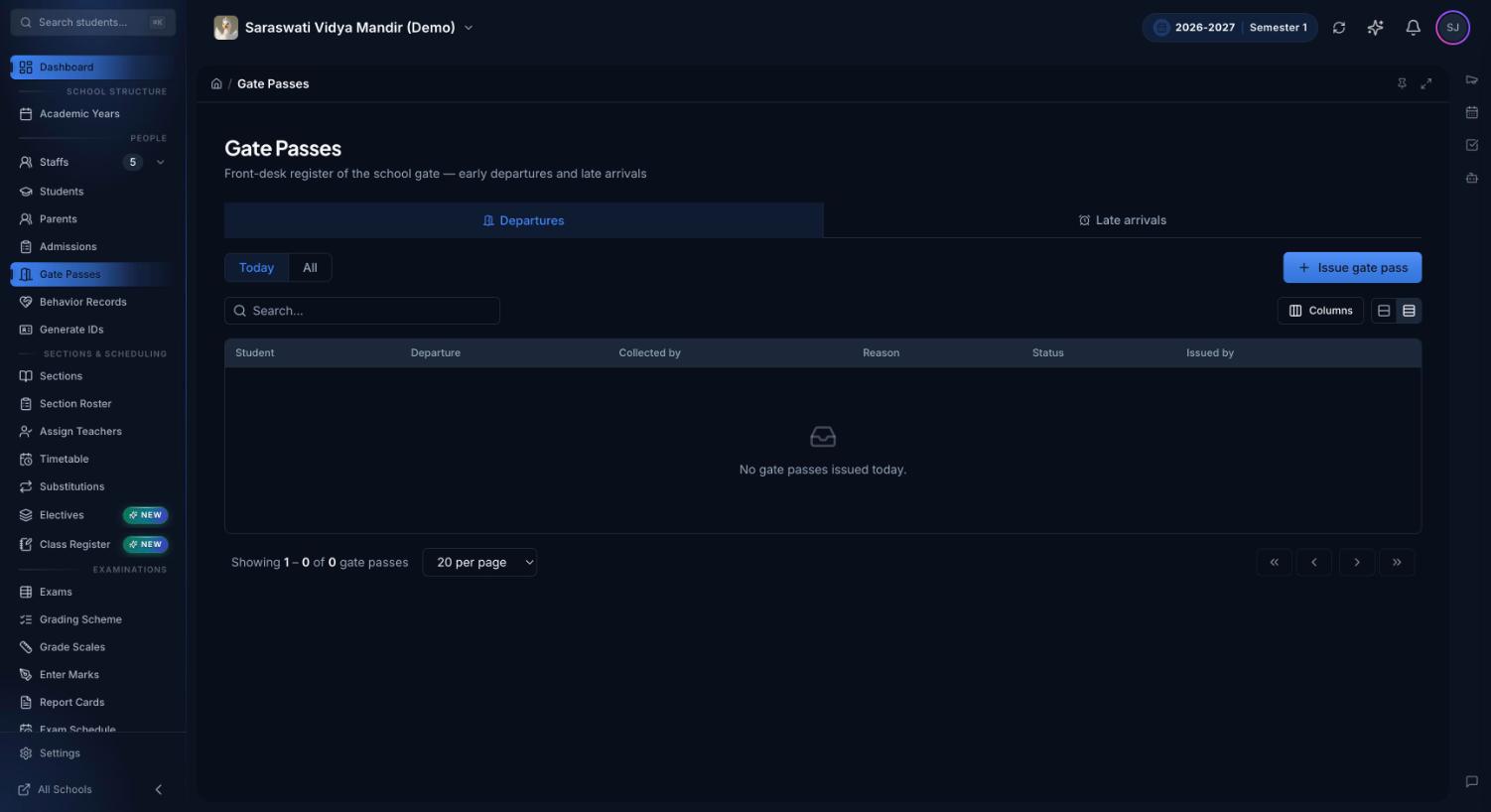
The Gate Passes register: today's early departures and late arrivals, who collected each student, and who issued the pass.
What is a visitor management system for schools?
A visitor management system for schools is software the front desk uses to record everyone who enters or leaves the campus: visitors, parents collecting children, and students arriving late or leaving early. It replaces the paper visitor book and gate pass slips with a searchable record of who came, who they met, who collected which child, and when.
Paper registers fail at the moments that matter. A guard copying names into a visitor book can't tell whether the person at the window is on the child's pickup list. At 2 pm nobody can say how many visitors are still inside. The late-coming book stays at the gate, so the class teacher marks the student absent and the parent hears the wrong thing. And when a parent asks who collected their child last Tuesday, someone leafs through a month of handwriting.
What the front desk can do in Premeena
Every tool here uses the same student, guardian and staff records, so nothing is typed twice.
Gate passes for early departures
Pick the student, then the person collecting them from the pickup list on the student's record: guardians and emergency contacts marked as allowed to collect. The pass keeps a copy of that person's name, relationship and phone, so a later edit to the contact doesn't rewrite it.
Overrides need a written reason
If an uncle or family friend who isn't on the list turns up, the desk can still issue a pass, but only by choosing Other person and typing a justification, such as written permission from the parent. The pass is marked Override, so it stands out later.
Guardian confirmation for students leaving alone
A student leaving unaccompanied needs a guardian's confirmation. Staff either record a phone call (who they spoke to, what was said) or email a guardian a link with Confirm and Decline buttons, valid for 24 hours. Until then the pass shows Awaiting confirmation.
Late arrivals land in the register
The desk logs the arrival time and reason, and Premeena marks the student Late in that day's register with a note such as 'Arrived 09:12 — bus delayed (front desk)'. If attendance hasn't been taken yet, the mark lands when the teacher saves. Finalised registers are never changed silently.
A manual gate entry log
Record each IN and OUT for students, staff, parents and visitors at a named gate. Premeena works out the direction from the person's last crossing and flags a double IN or an OUT with no matching IN. A wrong entry can be undone within two minutes and stays in the log as void.
Visitors with photo and badge
Register a walk-in visitor with contact details, purpose and host, and take a photo with a webcam or phone camera. Premeena checks for an existing record first. Print a badge with photo, host, gate, time in and valid-till time, and email the visitor a PDF copy.
Minimal ID details and a blocklist
The desk records the type of ID shown and only its last four digits, never the full number. Administrators can flag a visitor with a reason; a flagged visitor can't be checked in until the flag is lifted, and desk staff can see the flag but not change it.
Appointments with check-in
Book a visitor with a staff member. Premeena blocks double-booking and warns if the slot overlaps a lesson or duty. The staff member, and the visitor if they opt in, get an email with a calendar invite; opted-in visitors also get reminders the day before and 30 minutes before. Check-in tells the staff member by email.
On campus now and roll call
A live count of people and visitors inside, gate passes still open three hours after departure, and people still checked in from a previous day. Roll-call mode lists everyone on campus by gate and prints it for a fire drill. The multi-gate overview charts crossings by hour.
Section attendance in Premeena. A late arrival logged at the gate becomes a Late mark in that day's register, with the arrival time and reason in the note, so the class teacher doesn't record the student as absent.
How it works
Issuing a gate pass
Open Gate Passes, choose Issue gate pass and search for the student by name.
Premeena lists the student's authorised pickup contacts. Pick the person standing at the desk and check their ID against the record.
If the person isn't on the list, choose Other person, enter their name, relationship and phone, and write the justification. If the student is leaving alone, choose Self / Unaccompanied and add an authorisation note.
For an unaccompanied student, choose Call now if you have already spoken to a guardian, or Email confirmation link. The pass waits as Awaiting confirmation; you can resend the email or switch to a recorded call.
Enter the reason, departure time and any notes, and issue the pass. The register shows who issued it.
If the student comes back, mark the pass Returned. A pass made in error is cancelled with a reason and stays in the register marked Cancelled.
Logging a late arrival
At the gate desk, find the student and choose Mark late arrival. Enter the arrival time and the reason.
Premeena tells you whether the register was updated, will update when the teacher takes attendance, or was already finalised. A finalised register picks the mark up if it is reopened.
Confirmation links, emailed badges and appointment invites go out through the school's own email provider, which an administrator connects once in settings. Late marks follow the same rules as the rest of attendance management, and the attendance help pages explain drafts, finalising and reopening.
Who uses it
Receptionist or front-desk staff: issue gate passes, log late arrivals, check visitors in and out, book appointments, and note incoming phone calls in the call log with the caller, number, reason and the staff member it concerns.
Gate guard: record IN and OUT at their gate from a phone, tablet or computer browser.
Class teachers: find late-comers already marked Late when they open the register, instead of chasing the gate book.
Principal or owner: review overrides and unaccompanied departures, watch the on-campus count, flag visitors, and ask the AI assistant questions such as 'who left early today?' once AI is set up.
Parents and guardians: confirm or decline an unaccompanied departure from an email link.
Every front-desk action is its own permission. With custom positions you can give a receptionist gate passes, visitors and appointments and nothing else: no fees, no marks.
Paper gate registers vs Premeena
The same front-desk jobs, on paper and in Premeena.
Task
Paper registers and slips
Premeena
Who may collect a child
The guard relies on memory or a list kept in a file
The pickup list comes from the student's record; anyone else needs a written justification on the pass
Student leaving alone
A verbal OK that is rarely written down
A guardian confirms by recorded call or email link before the pass is issued
Late-comers
Written in a gate book; the class register may still say absent
Marked Late in that day's register with the time and reason
Who is on campus
Count visitor-book entries with no time out
Live count, visitors inside and a printable roll call
Visitor ID
Full ID numbers copied into a book anyone can read
ID type and last four digits only
Mistakes
Overwritten, struck through or torn out
Cancelled or voided with a reason; the original stays on record
Finding an old record
Leaf through weeks of handwriting
Search the register, or switch between today's passes and all passes
For schools in India, and everywhere else
Child-safety guidance from boards and state education departments in India commonly expects schools to control entry, keep a visitor record and release children only to known adults. Premeena covers those three habits without new hardware. The visitor form lists the IDs people carry (Aadhaar, driving licence, passport, voter ID) and keeps only the last four digits, so the school isn't storing full Aadhaar numbers for every visitor.
The front-desk screens are available in Hindi as well as English, Spanish and French, and each staff member can choose their own language. Nothing in the workflow is India-only, and you can try the gate desk in the live demo school without signing up.
What Premeena doesn't do (yet)
No gate hardware. Card, QR, RFID and biometric readers aren't supported yet. Every crossing is recorded by a person, so busy gates need a staff member with a phone, tablet or computer.
No SMS or WhatsApp. Guardian confirmation is a recorded phone call or an email link, and badges and appointment messages go by email.
No printed gate pass slip. Gate passes live in a digital register. If your guard wants paper too, use our school gate pass format alongside it.
Early departures don't change attendance. Late arrivals update the register, but a gate pass doesn't mark the student out for the rest of the day, so the class teacher still needs to be told.
Emails need your provider. Until an email provider is connected, confirmation links, emailed badges and appointment invites aren't sent. The phone-call option works without it.
Frequently asked questions
What is a visitor management system for schools?
It is software that records who enters and leaves the campus: visitors, parents collecting children, and students arriving late or leaving early. Premeena's version adds gate passes, a gate log, visitor badges and appointments, and it is part of the free core platform.
How does a student gate pass work in Premeena?
The front desk picks the student and the person collecting them from the student's authorised pickup list, enters the reason and time, and issues the pass. An adult who isn't on the list needs a written justification, and a student leaving alone needs guardian confirmation.
Can a parent confirm an early departure by SMS or WhatsApp?
Not yet. The desk either records a phone call with the guardian or emails a confirmation link that stays valid for 24 hours. The guardian taps Confirm or Decline on the page it opens.
Do late arrivals update attendance automatically?
Yes. A late arrival logged at the desk marks the student Late in that day's class register with the time and reason. If attendance hasn't been taken yet, the mark is applied when the teacher saves; a finalised register isn't changed unless it is reopened.
Does it work with ID card scanners, QR codes or biometric devices?
No. Gate entries are recorded by staff in any computer, tablet or phone browser. Card, QR, RFID and biometric readers aren't supported yet.
Do we need special hardware for visitor badges?
No. Photos come from a webcam or phone camera, and badges print from the browser on an ordinary printer.
Can we limit what reception staff can see?
Yes. Gate passes, the gate log, visitors and appointments are separate permissions, so you can create a position for reception that covers only the front desk.
Is the front desk module free?
Yes. It is part of Premeena's free core platform, with no per-student fee and no setup fee. You can try it first in the live demo school without signing up.