Student attendance management software that takes seconds, not periods
Premeena replaces paper registers and spreadsheets with fast digital attendance for every section — complete with late arrivals, gate passes, parent visibility, and a full audit trail.
Every school takes attendance; very few can use it. A paper register captures a tick per student per day, but it cannot answer the questions that actually matter: which students are sliding toward chronic absenteeism, which sections have a pattern of late arrivals, and whether the numbers you report to your board or education department are actually accurate. By the time paper records are compiled into a monthly summary, the moment to act on them has already passed.
Spreadsheets are only a small improvement. They still depend on someone re-typing marks, they have no concept of who edited what, and they quietly break the first time two people edit the same file. Student attendance management software exists to solve exactly this: capture attendance where teaching happens, in seconds, and make the data usable the moment it is saved.
Section-wise marking
Teachers open their section roster and mark the whole class in seconds — present, absent, or late — from any device.
Late arrivals
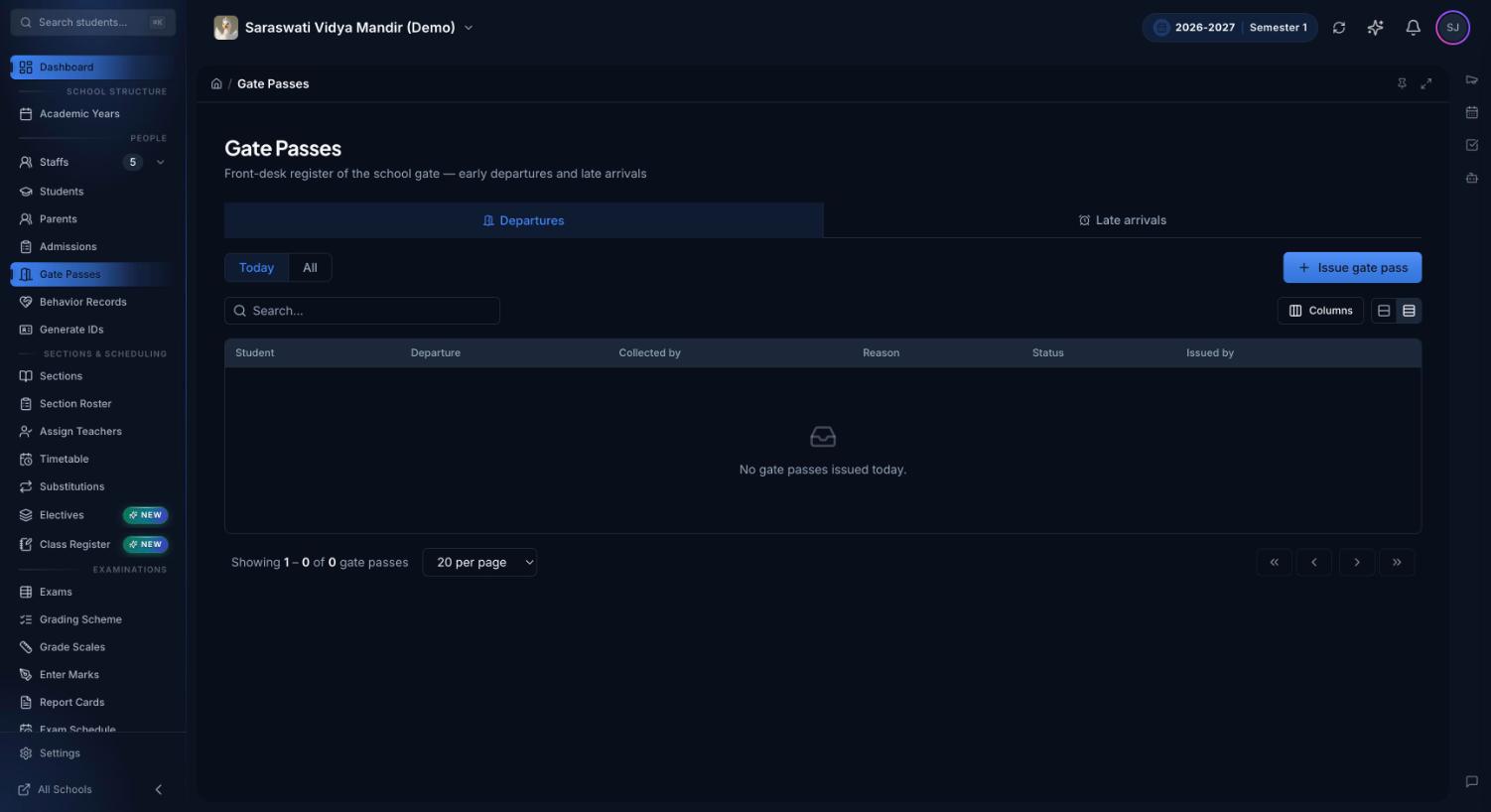
Latecomers are recorded as late, not lost in a present/absent binary — so patterns of lateness are visible early.
Gate passes
Early departures get a proper gate pass with a reason and a record, giving you a complete picture of student movement.
Parent visibility
Parents see their child's attendance in the parent portal — no more surprises at the end of term.
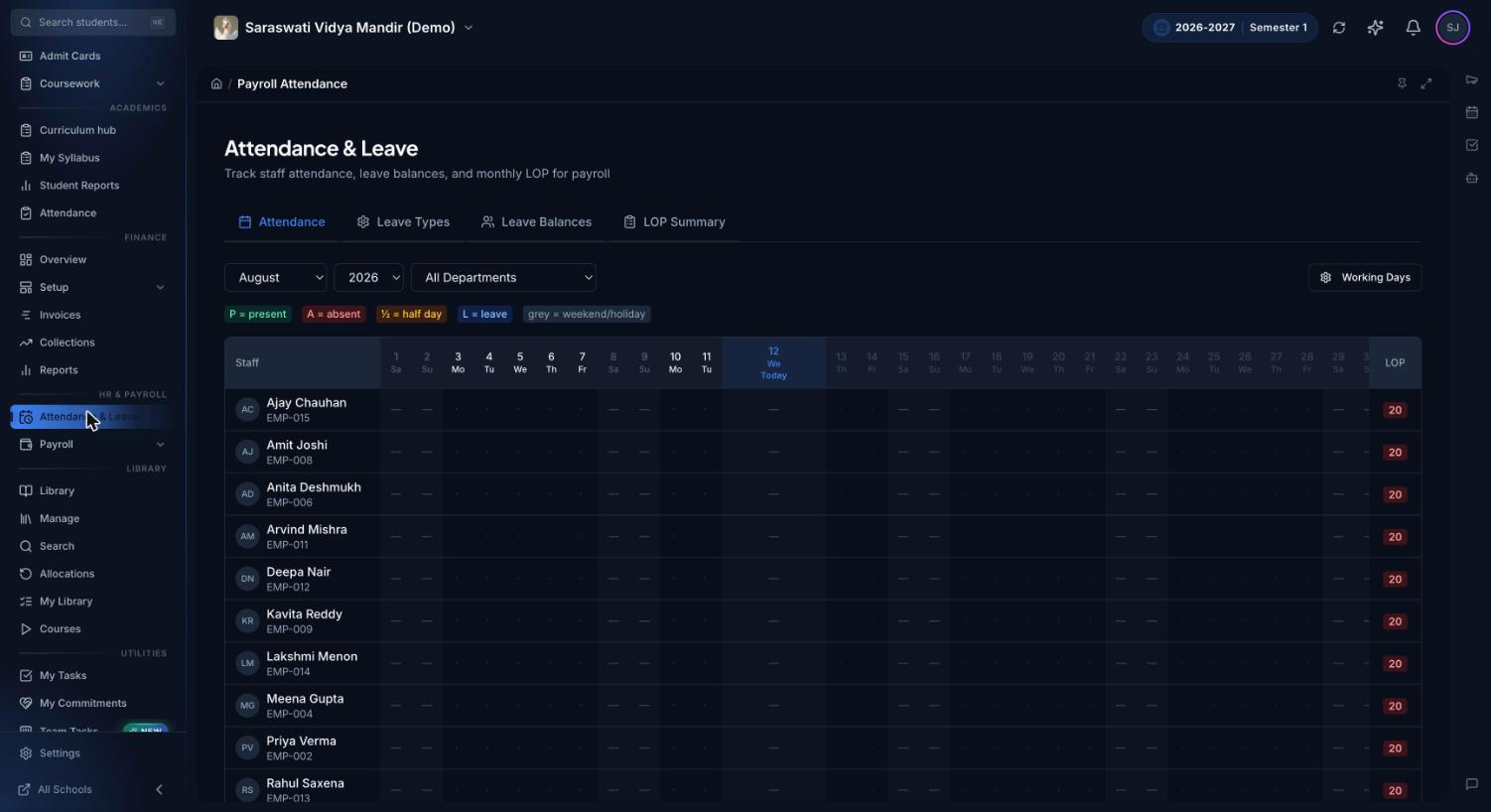
Staff attendance & payroll
Staff attendance is tracked alongside leave and feeds straight into payroll runs — one record, no re-entry.
Audit trail
Every mark and every correction is logged with who, what, and when — attendance data you can defend.
A daily attendance workflow that actually holds up
Software helps most when it encodes a clear process. A workflow that works for most schools looks like this:
Mark at the start of the period, not from memory. Teachers open their roster — set up once through sections and rosters — and mark attendance while students are in front of them.
Record the exceptions properly. A student who walks in ten minutes late is marked late; a student leaving for a medical appointment gets a gate pass. Both stay attached to the student's record.
Review weekly, not termly. Because marks are digital from the first minute, administrators can scan absence patterns every week and contact guardians while intervention is still cheap.
Close the loop with parents. Attendance appears in the parent portal automatically, which quietly improves accuracy: numbers that parents can see tend to be numbers that get taken seriously.
The same discipline applies to your staff. Premeena keeps staff attendance in its own module, connected to leave types and payroll, so the December payroll run doesn't start with a stack of paper registers.
If you are still designing your process, our guide on how to take student attendance covers the trade-offs — daily versus period marking, deadlines, backup markers — before any software enters the picture.
Set up in an afternoon
Attendance in Premeena sits on top of your school structure: create the school, define the academic year, add grades and sections, and import students by CSV. The setup guide walks through it step by step, and most schools are marking their first digital attendance the same day. Attendance is part of the free core platform — see pricing for what's included.
Frequently asked questions
Can a teacher fix an attendance mistake after submitting?
Yes. Attendance records can be corrected after submission, and every change is written to the audit trail, so administrators can always see what was changed, when, and by whom.
Who can see a student's attendance?
Access is role-based. Teachers see the sections they teach, administrators and school owners see the whole school, and parents see only their own children through the parent portal.
Does Premeena track staff attendance too?
Yes. Staff attendance is recorded separately from student attendance and flows directly into HR and payroll, so payroll runs can account for attendance and leave without re-entering data.
How are late arrivals and early departures handled?
Premeena records late arrivals and issues gate passes for early departures, so a student's day is captured accurately instead of being flattened into a single present-or-absent mark.
Is attendance management free to use?
Yes. Attendance is part of Premeena's free core platform, along with student records, timetables, assessments, fees, and the parent, teacher, and student portals. No credit card is required.