Exam management system for schools from date sheet to locked results
Create an exam, add papers for every class and subject, set dates, times and rooms, print admit cards and watch marks come in. Then publish results to students and parents, and lock them when they're final.
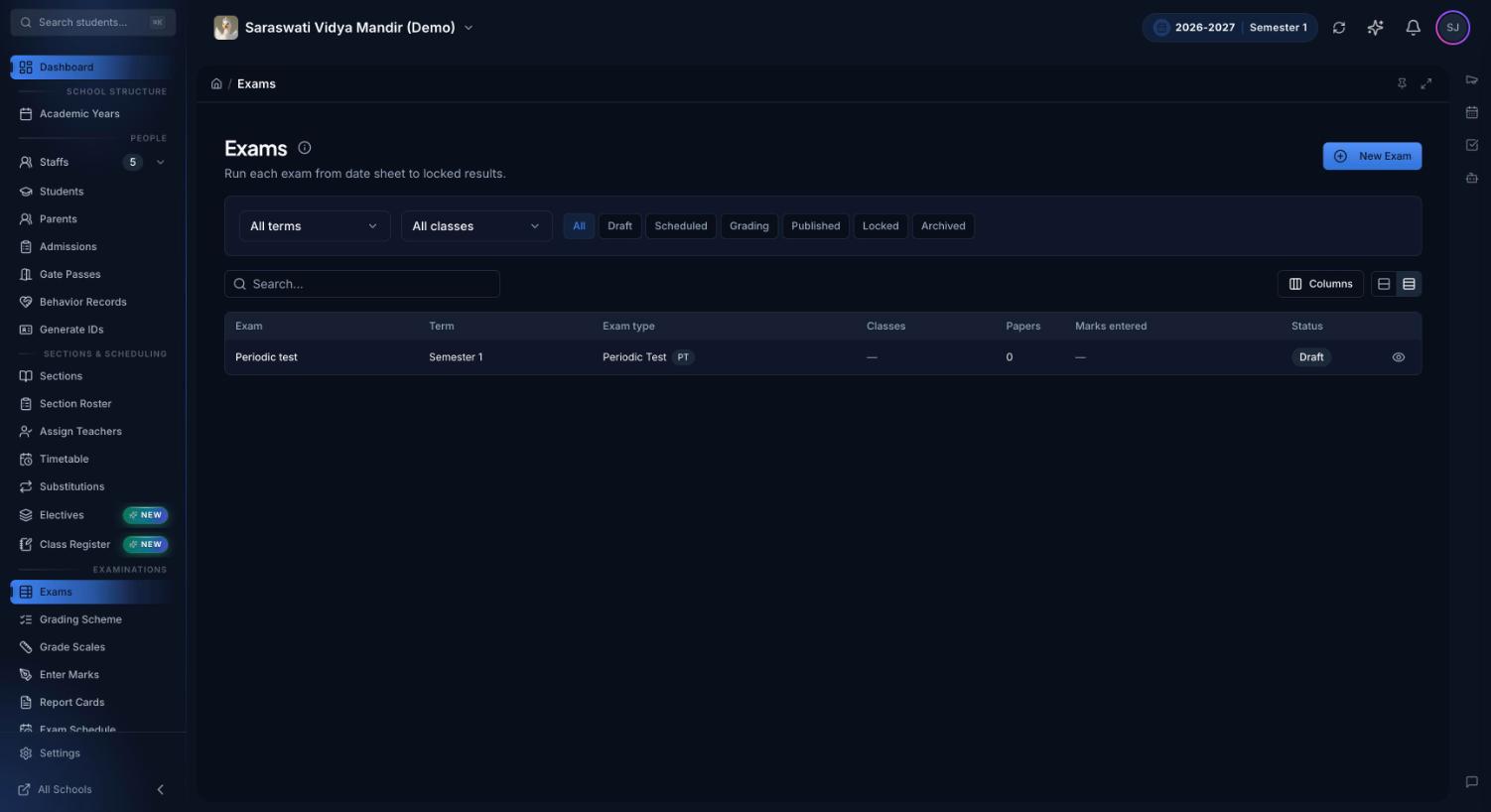
Each exam shows its term, exam type, classes, number of papers, marks entered and status, so you can see what still needs a date sheet, marks or publishing.
What is an exam management system?
An exam management system is software that runs a school's exams from start to finish: creating the exam, scheduling each paper, issuing admit cards, collecting marks from teachers and publishing results to students and parents. The date sheet, the marks and the final results live in one record, so they always agree.
Without one, exam season runs on loose files. The date sheet is a Word document that is re-sent after every change, admit cards are typed one by one, and the coordinator chases missing marks by phone and group message. Results go out before every paper has been checked, and a mark changed after release leaves no trace. None of this is hard, but together it is what makes exam weeks heavy for the office.
Key features
Part of the free core platform, connected to grading and report cards.
Exams tied to your grading scheme
An exam, such as the Half-Yearly Examination, belongs to one term and one exam type, so each paper counts toward the right share of the class's grading scheme. Papers can only be added for classes whose scheme includes that exam type.
Papers for many classes at once
Pick classes and subjects and Premeena creates one paper per pair, skipping subjects a class doesn't take. An elective becomes one paper marked only for its enrolled students. Each paper's pass mark comes from the class's grade scale.
Date sheet with clash warnings
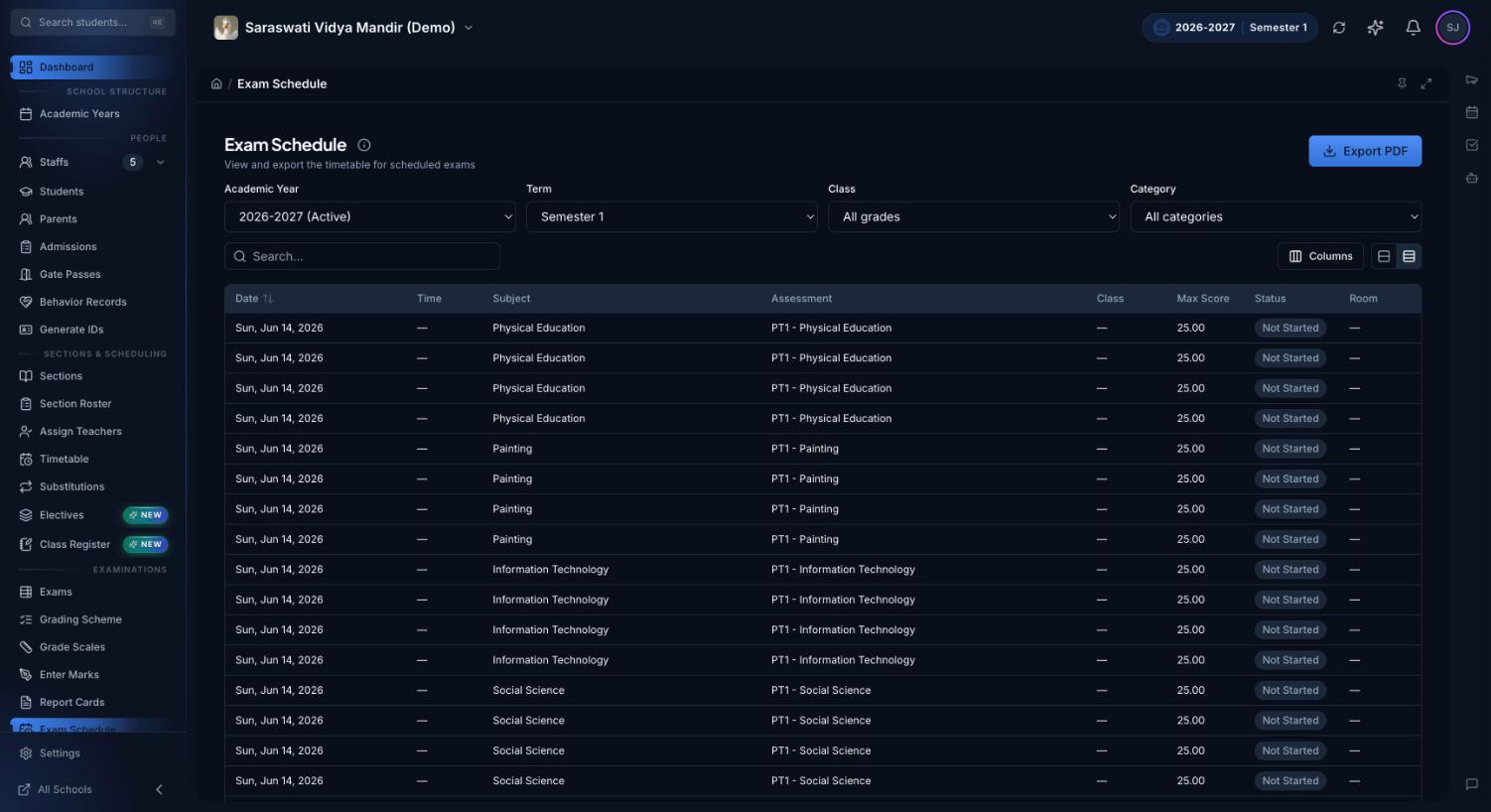
Give each paper a date, start and end time and room. The date sheet flags any two papers for the same class that overlap, and two papers booked into one room at once. The exam schedule filters by term, class and exam type and exports a PDF.
Admit card generator
One PDF for a whole section, six cards to an A4 page. Each card shows the school, term, exam type, the student's photo or initials, admission number and every paper's date, time, subject and room, with a signature line and seal box.
Marks-entry progress
For every paper, see students enrolled, marks entered and marks published, labelled not started, in progress or complete. Filter by section. The exams page also highlights the paper furthest behind and the papers due in the next seven days.
Publish results, notify families
Publishing releases only papers where every enrolled student has a mark, so finished subjects can go out while others are still being marked. Students and guardians get an in-app notification, a web push and an email.
Lock, unlock and archive
Lock a published exam to freeze its marks. Unlocking needs academic override permission and a written reason, and both are recorded in the audit trail. An exam with marks is archived rather than deleted, and restoring brings back the exact status it had.
Duplicate an exam
Copy an exam's papers, maximum marks, weights, times and rooms into a new exam, in the same term or another. Dates are cleared for the new date sheet, and pass marks are recalculated from the current grade scale.
AI results insights
If your school has AI set up, one click turns an exam's results into a readout for the principal: summary, strengths, concerns, students who failed two or more papers and next steps. The numbers are calculated from your marks first; the AI only writes the commentary.
The exam lifecycle: what happens at each stage
Draft, Scheduled and Grading change on their own as you work. Publishing, locking and archiving are deliberate actions that need the matching permission, set per role or position.
Status
What it means
What's allowed
Who acts
Draft
The exam exists; papers are missing or undated.
Add and remove papers, rename the exam, change its term or exam type while it has no papers.
Exam coordinator or office
Scheduled
Every paper has a date. Set automatically.
Adjust times and rooms, print admit cards and the date sheet.
Exam coordinator
Grading
The first mark is in. Set automatically and never reverts.
Teachers enter marks. Publishing releases papers as they are completed. A paper with marks cannot be removed.
Teachers and exam coordinator
Published
Every paper is fully marked and released.
Families see marks. No papers can be added or removed. Mark corrections are visible at once and logged.
Principal or anyone with publish permission
Locked
Results are final.
No mark can change. Unlocking returns the exam to Published and needs a written reason.
Principal or academic head
Archived
Retired from the default list; used instead of deleting once marks exist.
Restore returns the exam to the status it had before.
Admin with delete permission
The exam schedule lists every paper by date with time, class, maximum marks, marking status and room, and exports the date sheet as a PDF.
How an exam runs in Premeena
Set up the grading scheme. Each class needs the exam type in its scheme for that term. This is where you decide how much the exam counts (see the assessments overview).
Create the exam. Name it and pick the term and exam type. It starts as a draft.
Add papers. Choose classes, subjects and any electives, and a maximum mark. Premeena lists any class and subject pairs it skipped.
Build the date sheet. Set each paper's date, time and room and clear any clash warnings. Once every paper is dated, the exam is Scheduled.
Share the schedule. Download admit cards per section and the date sheet as a PDF. Students see their own papers, times and rooms in the student portal.
Collect marks. Teachers enter marks per paper in Enter Marks, and the progress tab shows which papers are behind.
Publish, then lock. Publish releases finished papers and notifies families. Lock the exam when results are final. The marks flow into term and year report cards.
Who uses it
Principal: sees the exam season at a glance (exams ready to publish, papers being marked, recent results with pass rate and average), locks final results and reads the AI insights.
Exam coordinator or office: creates exams, builds date sheets, prints admit cards and chases the papers that are behind.
Heads of department: check syllabus coverage from teachers' lesson logs in the curriculum hub before papers are set.
Teachers: enter marks for their papers. Their dashboard lists papers already sat but not yet published for the sections they teach.
Students and parents: students see their exam timetable and download their own admit card; parents see the next exam and the latest result on the parent dashboard. Both are notified when results are published.
Spreadsheets and group messages vs Premeena
Task
Spreadsheets and messages
Premeena
Date sheet
A Word file re-sent after every change
One date sheet per exam, exported as PDF when needed
Clashes
Spotted by a parent, or on the day
Flagged for same-class and same-room overlaps
Admit cards
Typed or mail-merged per student
A section's cards in one PDF, with photos and rooms
Missing marks
Phone calls and group reminders
A progress count per paper, by section
Changes after release
No record of who changed what
Locked results; unlocking needs a logged reason
Unit tests, half-yearlies and pre-boards
Many Indian schools run a cycle of unit or periodic tests, a half-yearly exam and an annual exam, with pre-boards for classes 10 and 12. In Premeena each is an exam with its own exam type, so a periodic test and a half-yearly count for different shares of the term. For CBSE classes 9 and 10, periodic tests feed the 20 marks of internal assessment and the written exam carries the other 80; the CBSE section of the report cards page shows how to set that up.
Admit cards are often called hall tickets. Premeena's admit cards are for exams your school runs; for the board exams themselves, students use the admit card issued through the board. Staff and parents can use Premeena in Hindi or English.
What Premeena doesn't do (yet)
Online or proctored exams: papers are sat on paper and the marks entered in Premeena. There is no computer-based exam hall or proctoring.
Barcode or QR scanning: admit cards carry no barcode, and there is no hall-ticket scanning at the exam room door. Check cards against the section list.
Automatic date sheets: Premeena doesn't generate the timetable for you. You set dates, times and rooms; it warns you about clashes.
Invigilation and seating plans: there's no invigilator duty roster or exam seating plan generator yet.
Question papers: no question bank or paper-setting tool.
SMS or WhatsApp result alerts: these aren't available yet. Notifications go out in-app, by web push and by email.
Per-teacher marking reports: progress is tracked per paper and section, not ranked by teacher.
Frequently asked questions
What is an exam management system?
Software that runs school exams from start to finish: creating exams, scheduling papers, issuing admit cards, collecting marks and publishing results. In Premeena it connects to grading, so exam marks count toward term results without re-entry.
Can Premeena generate admit cards or hall tickets?
Yes. Choose a section and download admit cards for every student in one PDF, with photos if you have them, admission numbers and each paper's date, time, subject and room. Students can also download their own from the student portal.
Does the date sheet check for clashes?
Yes. Within an exam's date sheet, it warns when two papers for the same class overlap on the same day, or when two papers are booked into the same room at the same time. It doesn't build the date sheet for you.
Can we publish some subjects before all marking is done?
Yes. Publishing releases every paper where all enrolled students have a mark and holds back the rest. Run it again as more papers finish; the exam becomes Published once every paper is out.
Can results be changed after they are published?
Until the exam is locked, staff with permission can correct marks; families see the change straight away and the save is logged. After locking, marks only change if someone with academic override permission unlocks the exam and records a reason.
How do parents get exam results?
When results are published, students and guardians get an in-app notification, a web push and an email. The parent dashboard shows the latest result with subject percentages. It works in any phone browser and can be installed to the home screen.
Can we reuse last term's exam setup?
Yes. Duplicate the exam to copy its papers, maximum marks, weights, times and rooms into the same term or another one. Dates are cleared so you can set the new date sheet.
Is the exam management system free?
Yes. Exams, date sheets, admit cards, marks entry and results are part of Premeena's free core platform, with no per-student fee. AI results insights only work once your school has AI configured in settings.