AI for schools that answers from your own school data
Ask a question in plain English, such as which invoices in Class 10 are overdue or who was absent in 8-B today. The assistant looks it up in your school's records and answers in a line or a small table. It can read your data. It can't change it.
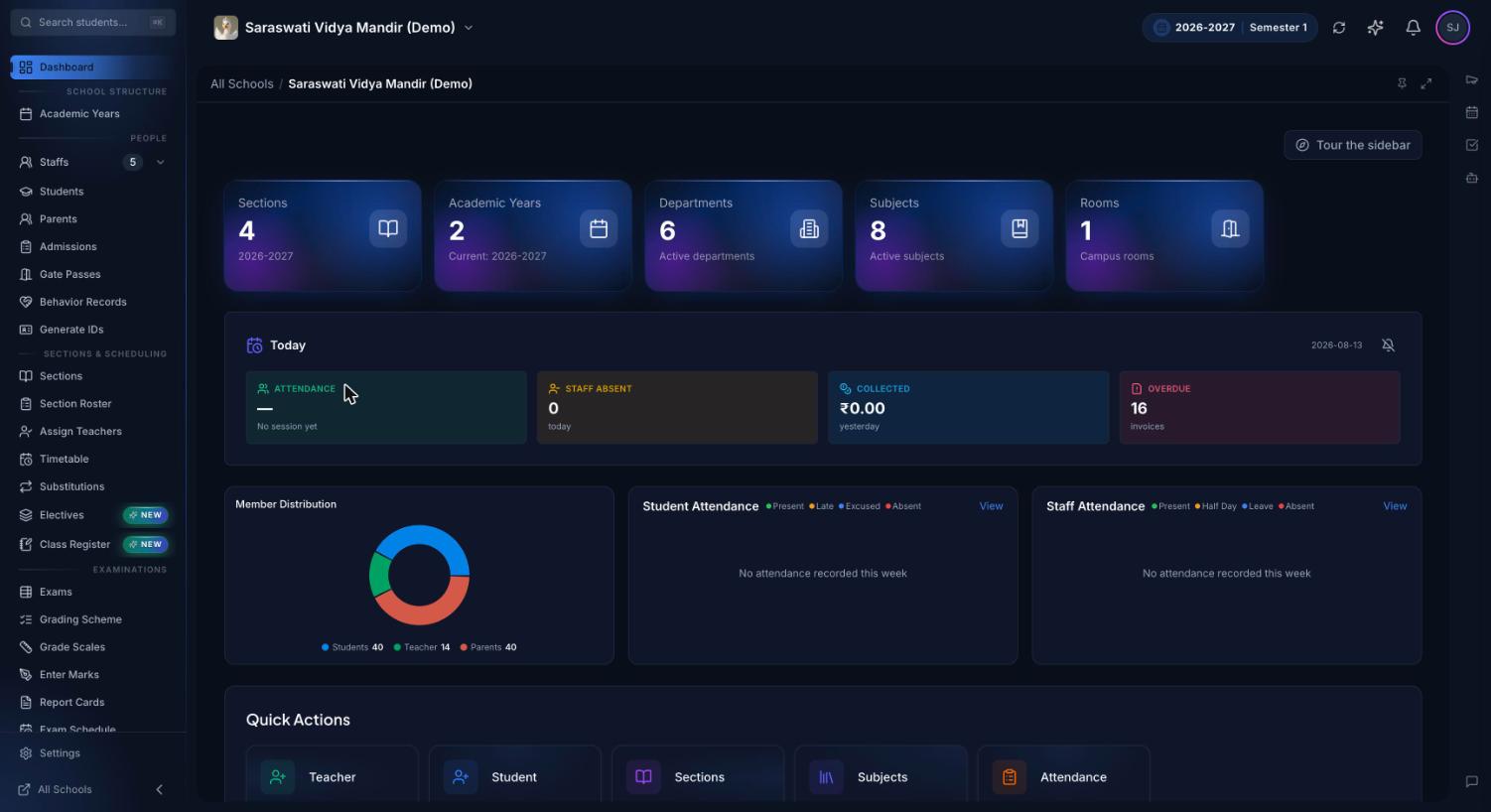
The owner's dashboard in the demo school. The AI assistant opens as a side panel from the icon rail on the right edge of every page.
What is an AI assistant for school administration?
An AI assistant for school administration is a chat tool that answers staff questions by looking up the school's own records: attendance, fees, exam results, timetables, staff and students. Instead of opening four reports and adding up columns, you ask one question and get the figure, the list or the name. This is what most people mean by AI school management software.
A general AI chatbot knows nothing about your school unless you paste student data into it. Premeena's assistant works the other way round: for each question it runs read-only lookups on your school's records, takes its numbers from them, and turns down questions unrelated to your school or Premeena.
What the assistant can look up
Each card is a group of read-only lookups; a question only gets the lookups for its topic. The assistant also answers how-to questions from the help centre, names the article, and says so when none matches.
Students, parents and staff
Student counts by status, a student's profile, attendance percentage and class history across years, and guardian names and phone numbers. For staff: counts, profiles and the subjects each teacher teaches. The assistant never returns login IDs, passwords or staff salaries, even when asked directly.
Attendance and the front desk
A class's register for one day, student by student, or a date range with daily totals, the attendance rate and the students below 75%. A staff member's attendance summary. Gate passes and late arrivals for a day, a date range or one student.
Fees
Total invoiced, collected, outstanding and overdue, with the collection rate. Payments grouped by method, such as cash or bank transfer, and invoices grouped by status. The most overdue invoices for the whole school or one class, with days overdue and balance.
Exams
Exams by status and an exam's full date sheet. Results from the marks entered so far: average, pass rate, grade bands, each paper and students at risk. A season summary of what's ready to publish, which paper is behind on marking and which papers are in the next seven days.
Timetables, schedules and departments
A class's weekly timetable and a teacher's teaching schedule, which classes have a timetable set up, double bookings in a staff member's week, and free slots for a meeting. Departments with their head, members and subjects, and each department's workload and syllabus coverage.
Behaviour, support and notices
A student's behaviour history and school-wide trends, from records visible to staff. Student-support caseloads, sessions and compliance gaps, with diagnoses left out unless the school enables them and the person asking may read them. Upcoming holidays, exams and events, and active announcements.
Questions you can ask
Questions the assistant is built to answer. Name classes, exams and departments the way your school writes them, such as IX-A or Periodic Test 1. "Today" and "this week" follow your school's timezone.
Question
What the assistant looks up
Who was absent in 8-B today?
That class's register for today, student by student
Which students in IX-A are below 75% attendance since 1 July?
The class's attendance for the date range, with students under 75% listed
How much fee is outstanding, and how much of it is overdue?
Invoiced, collected, outstanding and overdue totals, and the collection rate
Show the most overdue invoices in 10-A.
Overdue invoices with student, invoice number, due date, days overdue and balance
How did students do in Periodic Test 1, and which subject was weakest?
Average, pass rate, grade bands, per-paper results and students at risk
What's ready to publish, and which paper is furthest behind on marking?
The exam-season summary for the active year
When is Mrs Rao free for 45 minutes this week?
Her teaching and non-teaching schedule, and free windows of that length
Who left early on a gate pass today, and are they back?
Gate passes with reason, time out, return and who collected the student
Who is the class teacher of 6-A, and how do I reach Aarav's parents?
The class's primary teacher and the student's guardian contacts
How do I lock a payroll month?
The matching help-centre article, named in the answer
The demo school's finance overview. Ask the assistant what is outstanding or overdue and it reads these records: invoiced, collected, collection rate, overdue and the split by payment method.
How it works
Connect an AI source. In Settings, under AI, choose OpenAI, Anthropic, Google (Gemini) or an OpenAI-compatible service such as Azure OpenAI or OpenRouter, enter the model and API key, set an optional monthly token limit and test the connection. Or buy AI credits in the Marketplace. See the AI settings guide.
Open the assistant from the AI icon at the right edge of any page.
Ask. It picks the lookups for that topic, runs them, shows what it is doing and writes the answer as it arrives.
Follow up. Answers lead with the figure or name, use small tables for lists, and end with up to three suggested follow-up questions.
Usage is counted. When your monthly token limit runs out, chat pauses until the first of the next month. With AI credits, each answer draws from your balance.
Other places Premeena uses AI
These helpers use your school's own AI key. Each one produces a draft or a summary that a person reviews; nothing is saved or applied until they do.
Syllabus drafts: a subject's units and topics, learning outcomes for a unit, or the next topic to teach, edited by the teacher before saving.
Exam insights: Premeena calculates an exam's averages, pass rates and per-paper results; the AI turns those figures into strengths, concerns and recommended actions, without seeing individual mark rows. See exam management.
Electives setup: suggested elective areas, subjects and a selection policy for a grade, which the coordinator applies as they choose; see electives.
Team task quick-add: type "collect sports day consent forms from 7-B by Friday" for a draft task with due date and assignee, or paste meeting minutes to get up to 15 draft tasks, each created only when confirmed.
Student support drafts: session notes from a counsellor's bullet points, support plans and progress summaries. Diagnosis fields aren't sent, the AI is told not to state a diagnosis, and nothing is filed until a person saves it.
At-risk flags are not AI. The at-risk student list uses plain rules: low or falling attendance, and failing or falling grades. The same data always gives the same flags, and staff decide what happens next.
What the AI sees, and what it never sees
For each question, Premeena sends the AI provider the question, the last few messages of the conversation, a short school description (name, today's date, active academic year, class and department names) and the lookup results. It doesn't send your whole database.
Which provider: with your own key, the one you chose; with AI credits or the shared AI, the provider Premeena uses for that service. The provider's data terms apply.
Never in an answer: passwords, login IDs, API keys or staff salaries. Student-support diagnoses are also left out, unless the school switches on diagnosis in AI and the person asking has permission to read diagnoses.
Read-only by design: every lookup reads; none writes. The assistant can't mark attendance, edit marks, change fees or send messages.
Your school only: every lookup is filtered to your school using the signed-in session. The AI never handles a school identifier, so it can't reach another school's records.
Keys stay encrypted: API keys are stored with AES-256-GCM and never shown again after saving.
Limited users: the assistant is available to the school owner and managers. Teachers, parents and students don't have it.
Your history: each user can clear their own chat history.
If your school has rules about sharing student information with outside services, read your AI provider's data terms before connecting a key.
Ways to power the assistant
The assistant itself comes with Premeena's free core platform. The AI provider's usage is paid in one of these ways.
Option
Who pays the AI provider
Limit
What it powers
Your own API key
Your school, directly to OpenAI, Anthropic, Google or an OpenAI-compatible service
An optional monthly token limit you set
The assistant and every AI helper
AI credits
Bought from Premeena in the Marketplace
Each answer draws tokens from your credit balance
The assistant
Premeena's shared AI
Premeena, when it is switched on
A daily token allowance per school
The assistant
Who uses it
Owner: checks fees outstanding, overdue invoices and collections by method. See fee management.
Principal (manager account): follows exam progress, weak subjects and students below 75%. See attendance management.
Anyone setting Premeena up: how-to answers from the help centre, with the article named.
What Premeena's AI doesn't do (yet)
It can't take actions. Marking attendance, sending fee reminders or editing a record happens on the relevant page, not in the chat.
It doesn't cover every module yet. There are no lookups for admissions, homework, the library or payroll, so questions on those go unanswered.
It isn't for teachers, parents or students yet. Only owner and manager accounts can use it.
No general questions or predictions. It declines general knowledge, coding and "what will happen" questions.
AI credits and the shared AI power the chat only. Syllabus, exam, electives, team-task and student-support drafts need your school's own key.
Frequently asked questions
What is AI in school management?
It means using AI for administrative work such as finding information in school records, summarising results and drafting plans. In Premeena that is a read-only assistant that answers from your school's data, plus drafting helpers whose output a person reviews.
Is this like ChatGPT for schools?
You ask in plain language the same way, but it isn't a general chatbot. It answers only about your school's data and Premeena, taking every figure from your school's records. You can power it with an OpenAI key if you like.
Can the AI change student records or send messages?
No. Every lookup the assistant can run is read-only, so it can't mark attendance, edit marks, change fees or send anything.
Which AI providers can we use?
OpenAI, Anthropic, Google (Gemini) or any OpenAI-compatible service such as Azure OpenAI or OpenRouter, with your own API key. You can also use AI credits bought in the Premeena Marketplace.
How much does the AI assistant cost?
The assistant comes with Premeena's free core platform. AI usage is paid to your provider through your own key, or with AI credits. A monthly token limit caps spending.
Is our student data sent to the AI provider?
Only what a question needs: the question, the recent conversation, a short school description and the lookup results. Passwords, login IDs and salaries are never returned. Check your provider's data terms before connecting a key.
What if the assistant gets something wrong?
It is built to take every figure from a lookup made for that question, and to say when it finds nothing or when a name matches two people. Check important figures on the relevant page before acting on them.
Set up your school, connect an AI key or buy credits, and ask your first question from any page. The assistant comes with Premeena's free core platform.